Environment Promotion Strategy
The Environment Promotion Strategy is the first available Managed Policy type. It enforces deployment ordering across environments: a system must be deployed to one or more prerequisite environments before it is allowed to be deployed to a target environment.
A typical use case is requiring that a system has been deployed to QA before it can be deployed to PROD — or, more generally, enforcing a promotion chain such as DEV → QA → PROD.
DEV, QA, PROD, STAGING, etc. used in this page are examples only. The actual environments available to configure are sourced dynamically from your platform's configuration — each Witboost instance defines its own set of environments, with its own names and priorities.
Prerequisite: deployment status data must reach the descriptor
Environment Promotion Strategy policies decide whether a precondition is met by reading deployment status data from the enriched descriptor at evaluation time, at a configurable field path (see Advanced Configuration). This data must be present in the descriptor by the time the policy evaluates — how it gets there depends on your setup.
Recommended: enable the Deployment Status Provider. This is a built-in Descriptor Enrichment
provider that automatically populates the descriptor under witboost.deploymentStatus, with one key per environment
the system has actually been deployed to:
witboost:
  deploymentStatus:
    production: deployed
    qa: deployed
In this example, development is absent because the system has not (yet) been deployed there. This matches the
policy's default field path and expected values, so no further configuration is needed. See
Enable Descriptor Enrichment Providers.
Alternative: populate the field yourself. The Deployment Status Provider requires the Builder, so it isn't available in every setup (e.g. a WCG-only license without Builder). Nothing in the Environment Promotion evaluator requires this specific provider — it only reads whatever is at the configured field path. If you don't use it, you are responsible for getting equivalent deployment status data into the descriptor by other means (a custom dynamic data provider, or a statically maintained field), and for pointing the Field path and Expected values in Advanced Configuration at that data.
If deployment status data is not present in the descriptor at the configured field path — for whatever reason — every precondition is treated as not met (see Missing data), which for Error-severity rules means every promotion is blocked. Make sure some mechanism populates this data before enabling an Environment Promotion policy.
Creating a policy
From Governance > Registry, click Create Policy, then select Environment Promotion on the Policy Type
Selection screen. This opens a dedicated 3-step wizard.
Step 1 — Metadata
- Name (required): must be unique within the Governance Registry.
- Description (optional).
- Resource Type (required): the system type this policy applies to (e.g., DataProduct, BIProject, MLProject).
- Tags (optional).
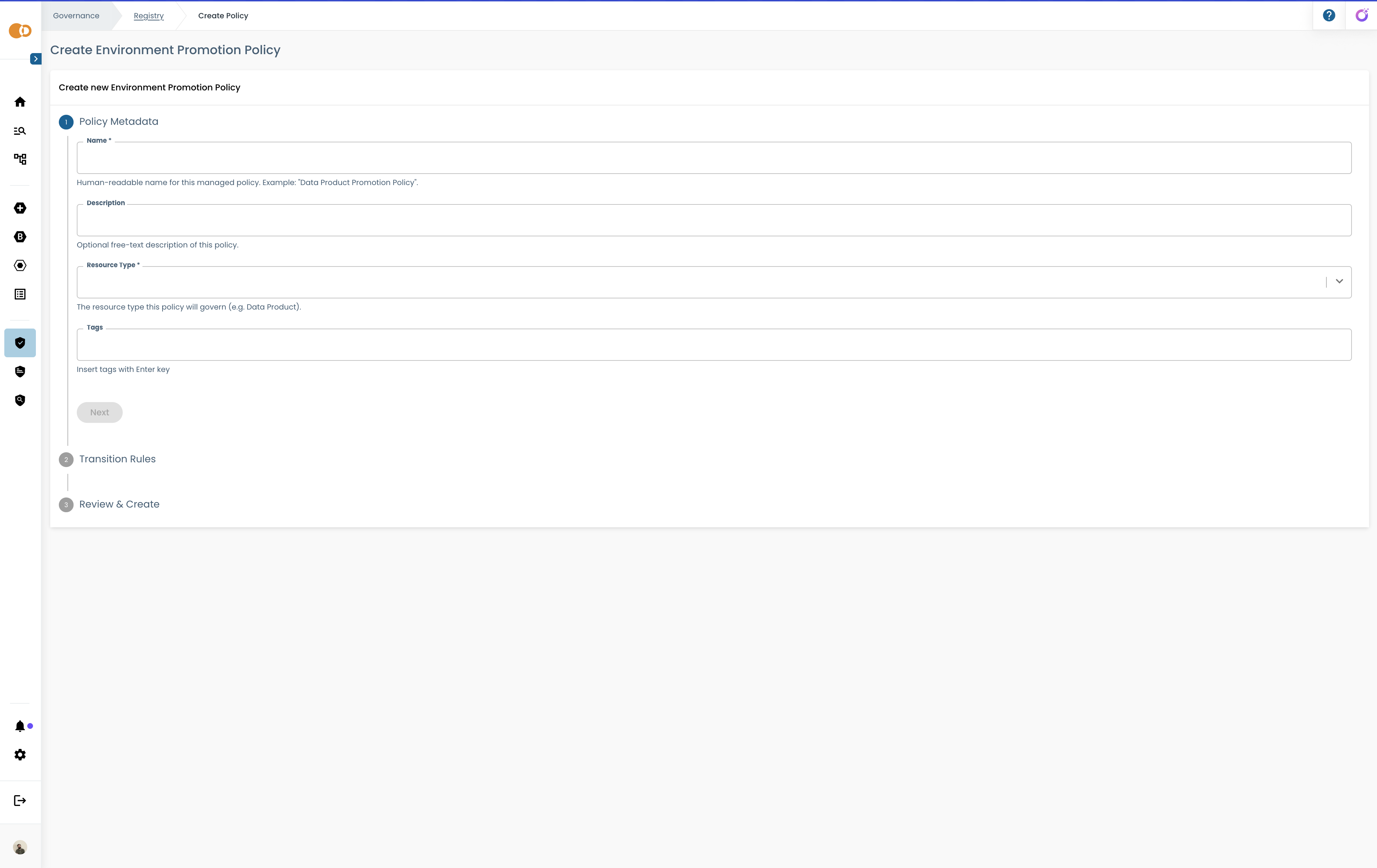
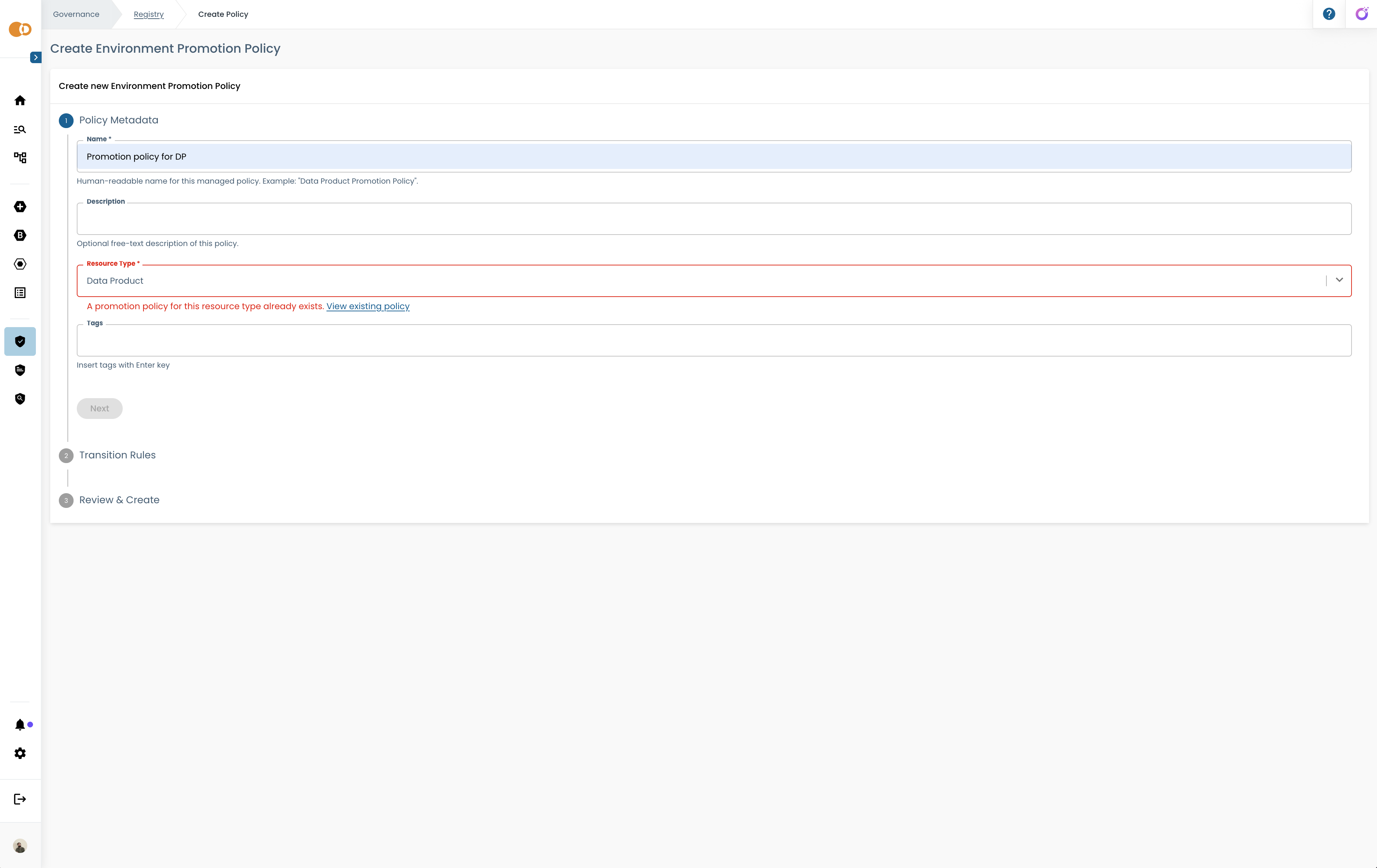
At most one Environment Promotion policy can exist per resource type. For example, you can have one policy for DataProduct, one for BIProject, and one for MLProject at the same time — but not two policies both targeting DataProduct.
If you select a resource type that already has an active promotion policy, the wizard shows a validation error with a link to the existing policy, so you can edit it instead of creating a duplicate. If you later delete the existing policy, that resource type becomes available again for a new one.
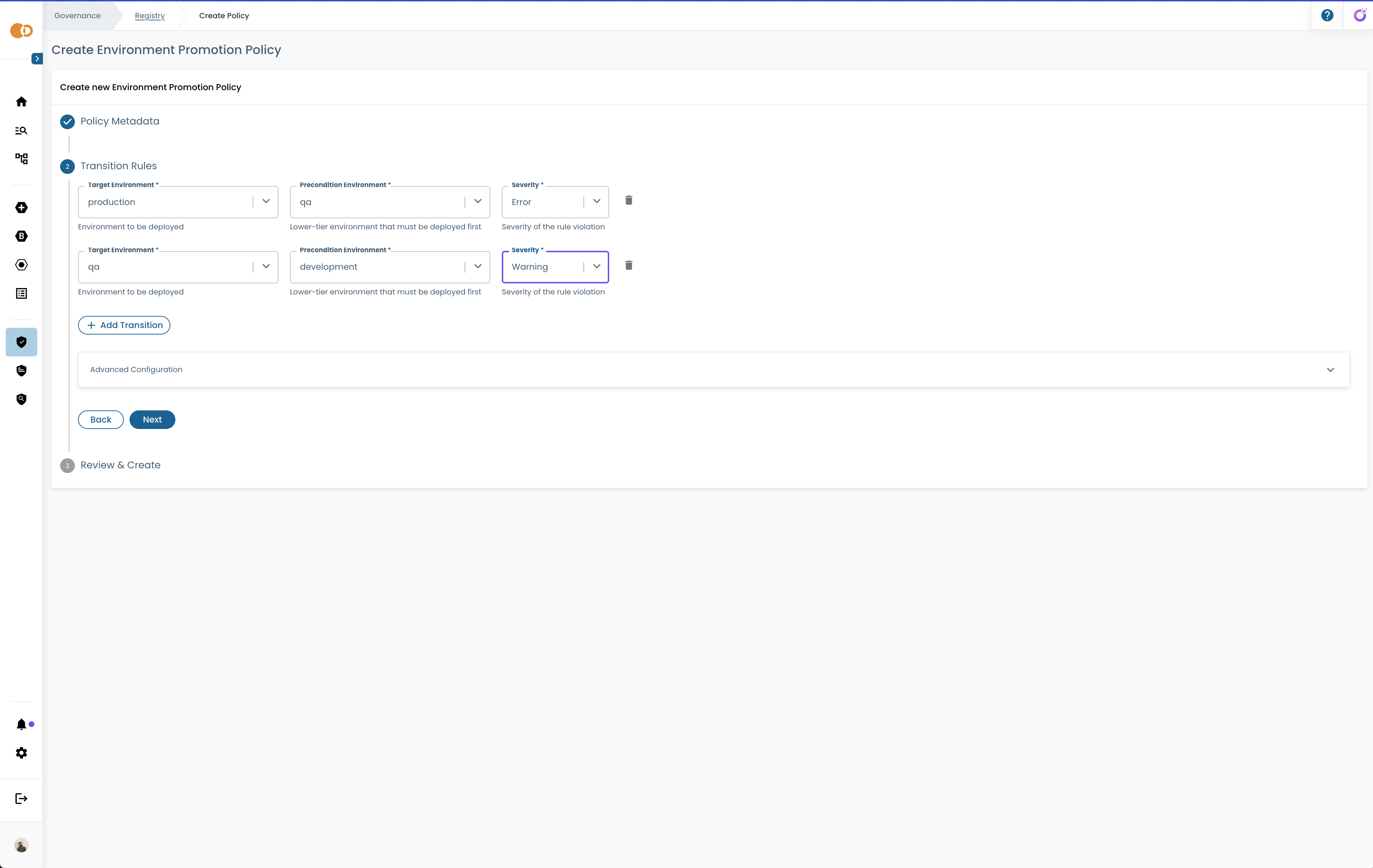
Step 2 — Transition rules
A transition rule defines one promotion requirement:
- Target Environment: the environment being deployed to.
- Precondition: the environment where deployment must have already occurred, shown as "Deploy in
{environment}". - Severity: Error, Warning, or Info — see Severity levels.
Click "Add Transition" to add rules, and remove any rule individually. You can define multiple rules for the same target environment — all of them must be satisfied (AND semantics). For example:
- Target = PROD, Precondition = "Deploy in QA", Severity = Error
- Target = PROD, Precondition = "Deploy in DEV", Severity = Error
means PROD deployment requires both QA and DEV to already be deployed.
At least one rule is required. The wizard rejects:
- A rule with the same environment as both target and precondition.
- Duplicate rules (identical target + precondition).
- Circular dependencies (e.g., Target=DEV/Precondition=QA together with Target=QA/Precondition=DEV).
Step 3 — Review & Create
A read-only summary shows the policy metadata and all transition rules. You can navigate back to any previous step to make changes. Clicking Create submits the policy.
A cross-environment policy
Custom policies are scoped to one or more environments you pick, but each policy still enforces its own rule independently of what happens elsewhere — there's no built-in concept of "environment B depends on environment A". The Environment Promotion policy is different: it is cross-environment by design. A single policy expresses the whole promotion chain at once — e.g. DEV → QA → PROD — instead of you having to piece that logic together across several unrelated policies.
Practically, this means:
- You configure one policy with rules for as many environments as your promotion chain needs, not one policy per environment.
- Enable / Disable applies to the entire policy at once: you cannot pause enforcement for PROD while keeping it active for QA. To stop enforcing a specific transition, remove that rule instead of disabling the whole policy.
- Editing — renaming, adding/removing rules, changing severity — takes effect consistently across the whole promotion chain immediately, with nothing to keep in sync manually across environments.
- Deleting the policy removes promotion enforcement for every environment it covered in one action; the confirmation dialog lists which environments are affected.
Severity levels
Severity is set per transition rule, not per policy — a single policy can mix severities across its rules.
| Severity | Effect when the precondition is not met |
|---|---|
| Error | The deployment is blocked. The governance evaluation result for the target environment is not compliant. |
| Warning | The deployment proceeds, but a warning is surfaced in the governance evaluation report. |
| Info | The deployment proceeds, with an informational note added to the report. |
Use Error for hard gates you always want enforced, Warning for recommended-but-not-mandatory ordering, and Info to simply record promotion history without any enforcement.
Advanced Configuration
Each promotion policy reads deployment status from a configurable location in the enriched descriptor. The wizard exposes this under an Advanced Configuration section, collapsed by default:
- Field path — where in the enriched descriptor to read deployment status. Default:
witboost.deploymentStatus. - Expected values — which value(s) at that path count as "deployed". Default:
["deployed"].
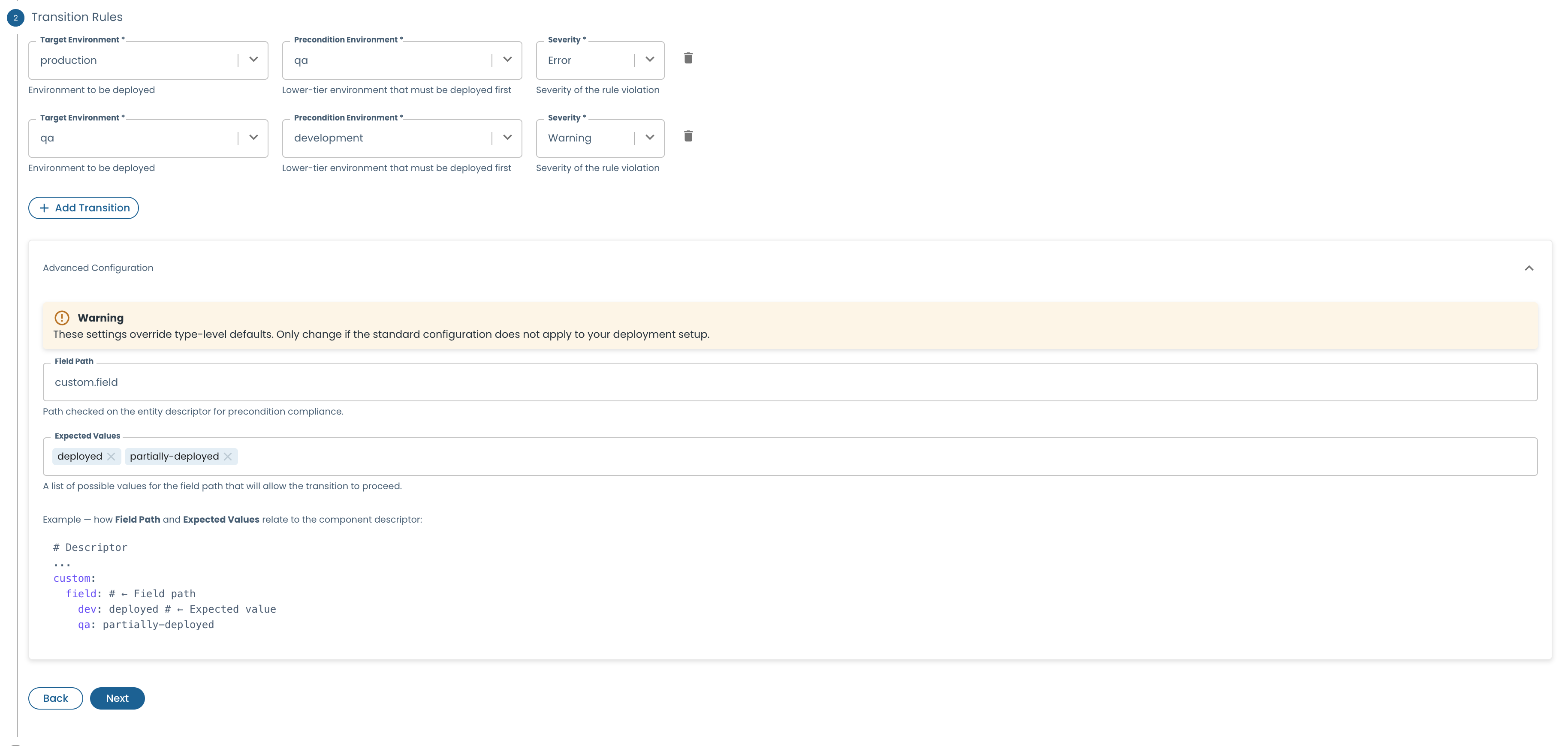
This section is automatically populated by the platform. Keep the default values unless you have a specific reason to change them and fully understand the implications — the values must match what your Deployment Status Provider (or any custom descriptor enrichment provider populating the same path) actually writes to the descriptor.
Enable, disable, and delete
Enabling or disabling a promotion policy toggles all correlated entities atomically — you cannot enable it for only one environment. Deleting it removes all correlated entities; the confirmation dialog states how many environments are affected (e.g., "This will remove governance enforcement for QA and PROD. Are you sure?").