Access Control Request Template
The Access Control Request Template is a standard Witboost template like the ones that are used to create Data Products and Components, but it has the purpose of customizing the access request for Witboost components through the Marketplace. The main value that this kind of templates wants to create is the fact that the Platform Team team can customize its own Access Control Request template with the pickers they need, and attach the content of the user input in the access request.
Different technologies often require different access request flows: a cloud storage bucket, a database, and an API gateway may each demand different information and approval steps. Witboost addresses this by allowing the Platform Team to register a dedicated Access Control Request Template for each technology. A template is linked to a specific technology via the spec.useCaseTemplateId field, which should match the useCaseTemplateId of the template managing that technology. When a user requests access to an output port, Witboost picks the template whose spec.useCaseTemplateId matches the technology of that output port, presenting a form tailored to that specific flow. If a template is registered without a spec.useCaseTemplateId, it acts as the default fallback and is used whenever no technology-specific template is found.
How it works
This kind of template can be imported only by the Platform Team team in the Settings section as shown in the following image:
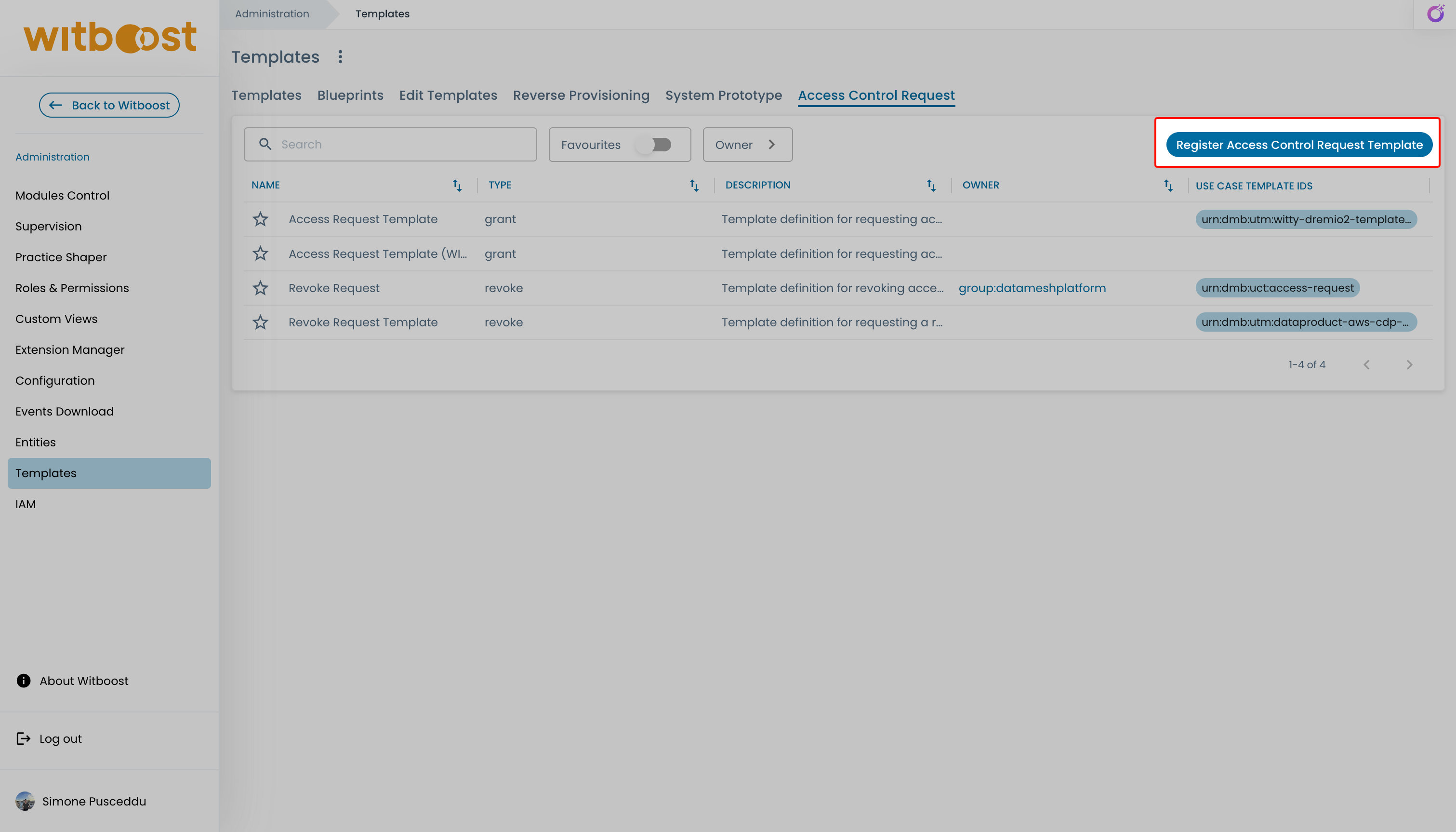
If the Settings section is not displayed, please refer to Platform Settings section to enable it.
Here the Platform Team team can insert the URL of an existing template in order to import it.
Multiple grant and revoke Access Control Request templates can be registered in Witboost. Uniqueness is enforced by type and spec.useCaseTemplateId: no two templates of the same type (grant or revoke) can share the same useCaseTemplateId, and at most one template of each type can exist without a useCaseTemplateId.
The user cannot register an Access Control Request Template by itself from the Builder page.
Access Control Request Template YAML file
The Platform Team team can define an Access Control Request template by simply creating a YAML file. An example of a grant access template is the following:
apiVersion: witboost.com/v1
kind: AccessControlRequestTemplate
metadata:
  name: access-control-request-template
  title: Access Control Request Template
  description: Template definition for requesting access
  tags:
    - aws
    - cdp
    - data-product
spec:
  useCaseTemplateId: urn:dmb:utm:my-use-case:0.0.0  # optional
  type: grant
  owner: datameshplatform
  parameters:
    - title: Access Request
      required:
        - identities
        - motivation
      properties:
        identities:
          title: Identities
          type: array
          description: Select users/groups that you are requesting access
          ui:field: IdentitiesPicker
          ui:options:
            maxIdentities: 5
            showOnlyUserMemberGroups: true
            allowedKinds:
              - user
              - group
            excludeGroups:
              # Accepts entity refs like group:name or group:namespace/name
              - group:bigdata
              - group:default/bigdata
        motivation:
          title: Motivation
          type: string
          description: Motivate your request
          ui:options:
            multiline: true
            rows: 6

  steps:
    - id: send_request
      name: Send Request
      action: access-request:send
      input:
        identities: '${{ parameters.identities }}'
        fields:
          identities: '${{ parameters.identities }}'
          motivation: '${{ parameters.motivation }}'
It has the same structure of a standard template, so any picker can be used in the parameters section. The main differences are the following:
- the
kindmust be AccessControlRequestTemplate - the
spec.typemust begrant - the
spec.stepspart is mandatory, and follows the above schema. For an Access Control Request Template to work properly, theactionwith valueaccess-request:sendmust be defined. - the
spec.steps.input.fieldsobject allows you to define all the fields that you want to attach to the request and that will be sent to an external service, if configured. spec.useCaseTemplateIdis an optional field that associates the template with a specific technology. Two templates of the same type cannot share the sameuseCaseTemplateId; likewise, at most one template of each type can omit it.
The identities field is required by witboost in order to know which are the subjects interested in this access request or revoke request.
Reserved context fields
When Witboost renders a grant Access Control Request Template, it injects reserved context fields into the form data. Fields prefixed with double underscores are supplied by Witboost and should be treated as read-only context, not as values entered by the user.
The following reserved fields are available:
__consumableInterface__: the selected consumable interface descriptor for which the user is requesting access.__context__: metadata about the access request.
The currently available __context__ values are:
| Value | Description |
|---|---|
environment | Environment of the selected consumable interface. |
recipient | Access request recipient. |
requester | Access request requester. |
requester_display_name | Display name of the requester. |
requesterRawEntity | Full requester entity. |
sender | Access request sender. |
As an example, the injected form context has the following shape:
__consumableInterface__:
  # Selected consumable interface descriptor
  # ...
__context__:
  environment: production
  recipient: user:recipient.example_com
  requester: user:requester.example_com
  requester_display_name: Requester User
  requesterRawEntity:
    # Requester catalog entity
    # kind: User
    # ...
  sender: user:requester.example_com
Form fields and picker expressions can reference these values directly from the form context, for example __context__.environment. Action step inputs are evaluated from the submitted template parameters, so the same value must be referenced as parameters.__context__.environment.
The following example defines a hidden EntitySelectionPicker field that derives the request environment from the reserved context:
spec:
  type: grant
  parameters:
    - title: Access Request
      properties:
        requestEnvironment:
          title: Request environment
          type: string
          ui:field: EntitySelectionPicker
          ui:fieldName: __context__
          ui:property: environment
          ui:widget: hidden
The same context can be passed for example to a Remote Picker API. In this example, the EntitySearchPicker sends the selected environment as a retrieval parameter:
resource:
  title: Resource
  type: object
  ui:field: EntitySearchPicker
  ui:options:
    entities:
      - type: Remote
        displayName: Resources
        displayField: '{{name}}'
        fieldsToSave:
          - id
          - name
        apiSpec:
          retrieval:
            microserviceId: 'example-resource-service'
            path: '/api/resources'
            method: 'POST'
            params:
              environment: '${{__context__.environment}}'
When forwarding the same value in an action step, use the parameters object, for example ${{ parameters.__context__.environment }}.
Template selection
When a user requests access to an output port, Witboost selects the template to display following this priority order:
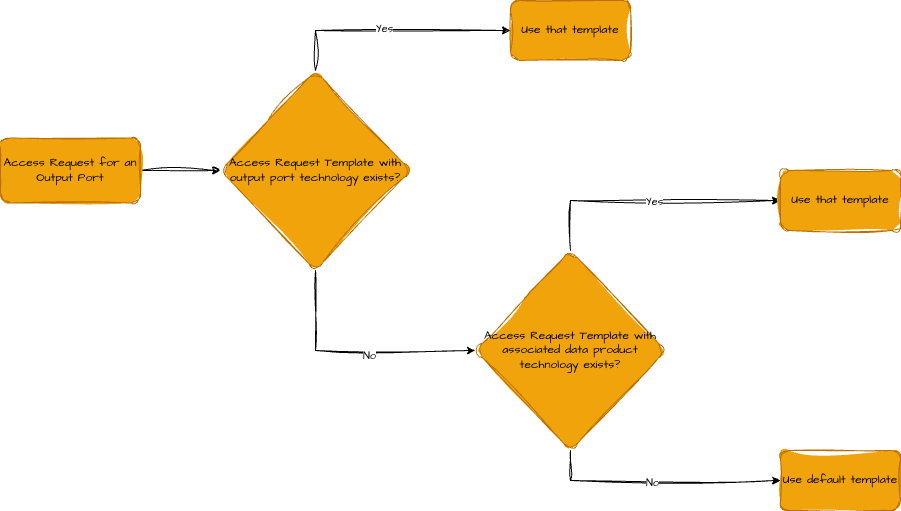
This allows to provide tailored access request forms for specific technologies while still having a generic fallback. The same resolution logic applies to revoke templates.